Quote with your costs.
Set labor, materials, overhead, reserve and target margin. See the suggested price alongside the price you plan to charge.
QUOTE GUARD
YOUR NEXT REPAINT. BETTER INFORMED.
Turn quotes and actual job costs into a clearer picture of what you earned—and what to change next time.
A practical spreadsheet toolkit for residential painting contractors. Quote with your costs, track the job, and review where the budget slipped.
14-day money-back guarantee · Even after downloading

A prompt to investigate—not an automatic diagnosis.
Simplified product preview using workbook example values.
THE GAP THAT MATTERS
Extra prep. More labor. A material run you didn’t expect. Record the difference so the next estimate starts with evidence.
Set labor, materials, overhead, reserve and target margin. See the suggested price alongside the price you plan to charge.
QUOTE GUARDSave the accepted quote as values. Add actual hours and dollars as the job progresses, keeping the original budget intact.
JOB TRACKERReview cost differences, record supported causes, and use eligible completed-job history to inform the next labor allowance.
LEAK REVIEW + DASHBOARDFROM THE INCLUDED EXAMPLE
Three comparable example jobs used 116 hours against 100 estimated. Applied to a new 40-hour estimate, that pattern suggests a 46.4-hour allowance.
Use the history, keep your own estimate, or enter a manual allowance. You stay in control.
Illustrative data, not a promised result. History recommendations require eligible jobs and can be withheld when data is unsuitable.6.4 additional hours × $44 labor cost
$281.60 of labor to account for.
MORE THAN A SPREADSHEET
Download one package. Keep the workbook, learn with the examples, and bring the checklists to your next job.
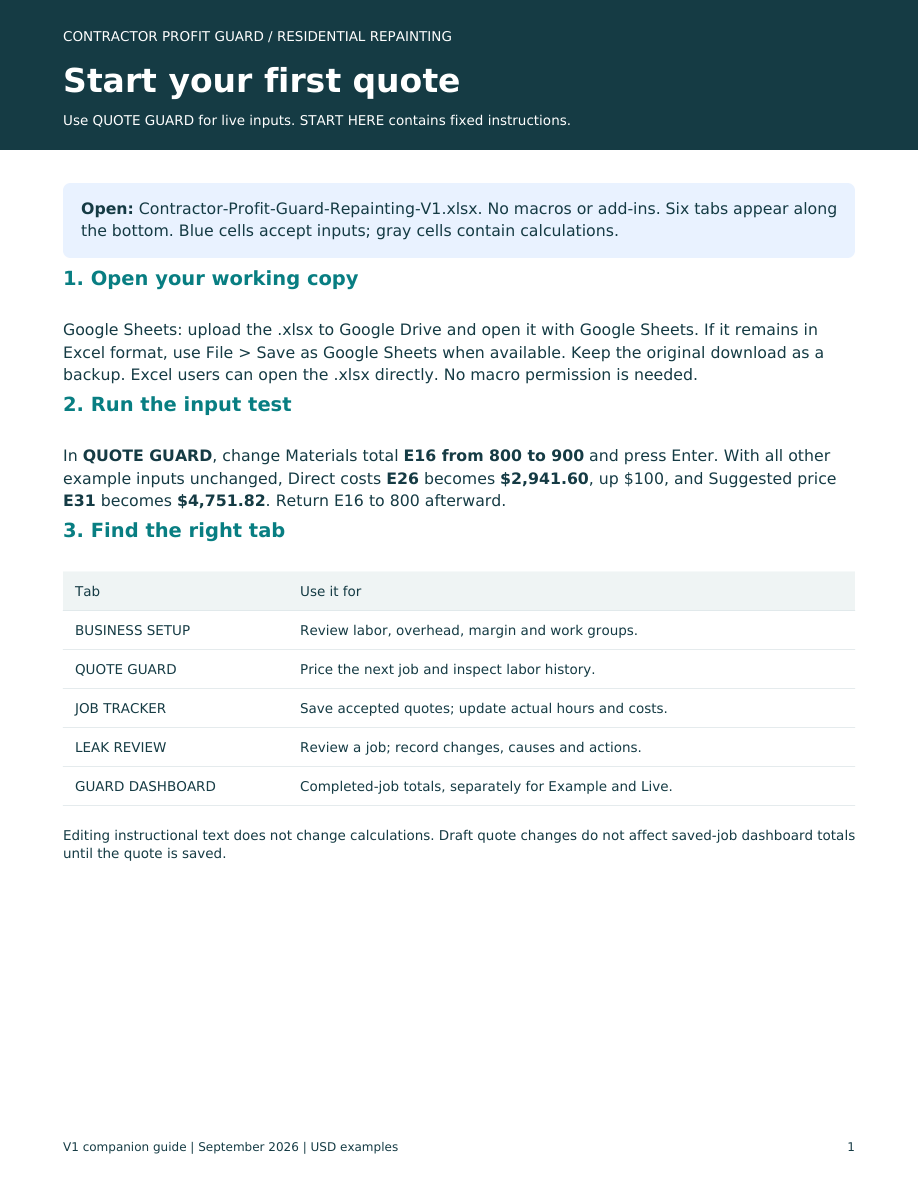
Six tabs covering setup, quotes, tracking, job review and a dashboard. Macro-free .xlsx file.
Quick-Start Guide, Painting Scope Checklist, Job Review Action Sheet and Worked Examples.
A 90-second narrated slide video and a text transcript. Pause and follow along in your copy.
A read-me covering opening the files, working rules and where to begin.
TAKE A CLOSER LOOK
Preview the included narrated slide walkthrough.
MADE FOR A PRACTICAL WORKFLOW
You enter the data. This toolkit does not measure rooms, sync your bank, send invoices, or replace your accounting system.
You can open the .xlsx in Google Sheets. Basic recalculation has been confirmed there; full workflow testing is still pending. Excel application testing is also pending for this review build.
No. The workbook uses spreadsheet formulas. Save accepted quotes using Paste special → Values only; there is no automated save button.
No. It helps compare plans and actual costs. Outcomes depend on your data, scope, pricing and execution. Gross profit is before overhead; after-overhead contribution is not business net profit.
The V1 workbook has 100 job slots and 300 review records. Formula cells are currently unlocked. History suggestions require qualifying completed jobs.
Try the toolkit with a 14-day money-back guarantee, even after downloading. Email support@contractorprofitguard.com with your purchase email or receipt number. Read the refund policy.
CONTRACTOR PROFIT GUARD
The workbook. The guides. The workflow.
CONTRACTOR PROFIT GUARD
Purchase Contractor Profit Guard for $39 USD. Enter payment details on Stripe’s secure checkout page.
After confirmed payment, return here to download your package. Download in the same browser you use for checkout.
By purchasing, you agree to our Terms of Use and Refund Policy. Read our Privacy Policy for information about payments and download access.
Secure checkout powered by Stripe. 14-day money-back guarantee.